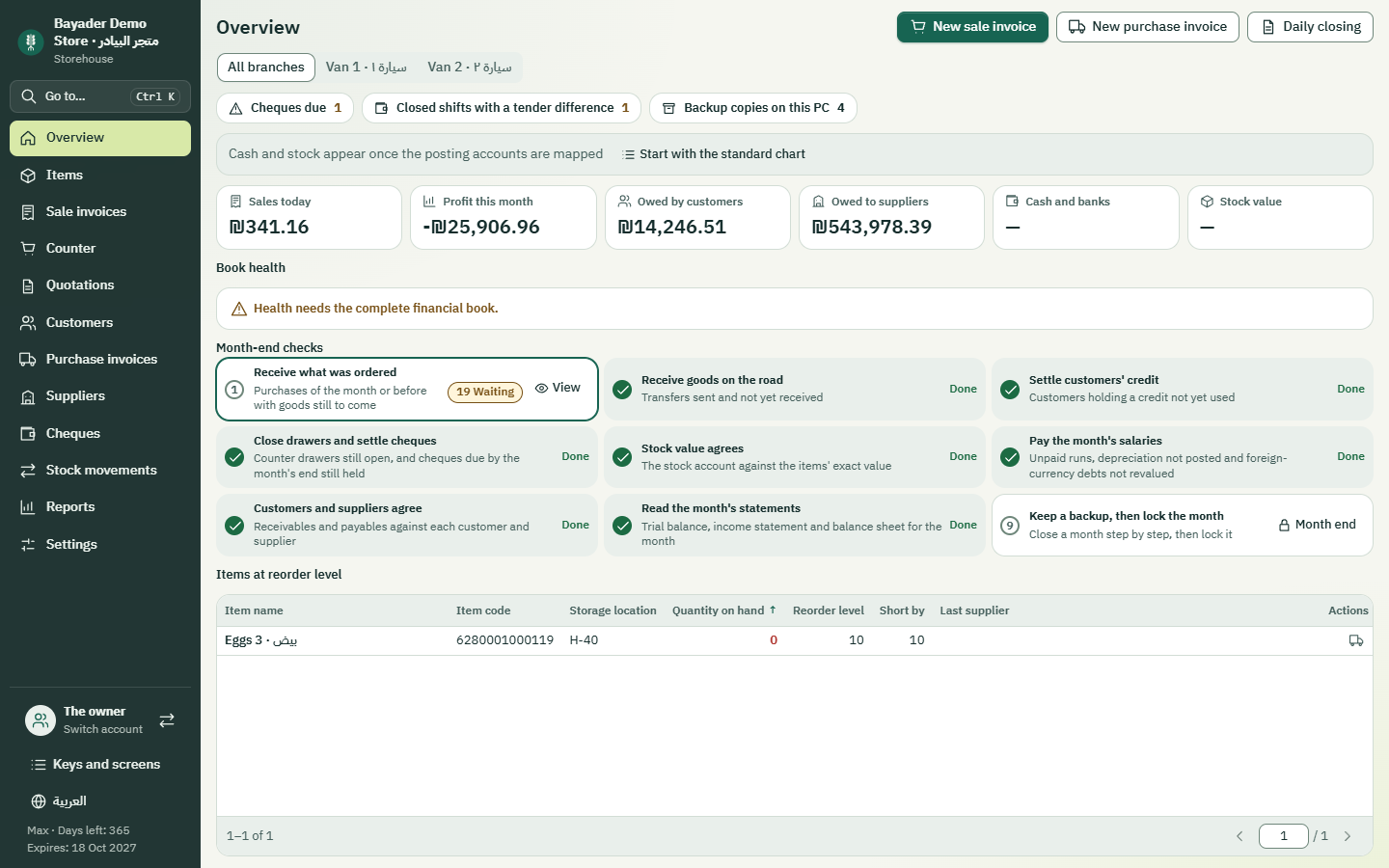
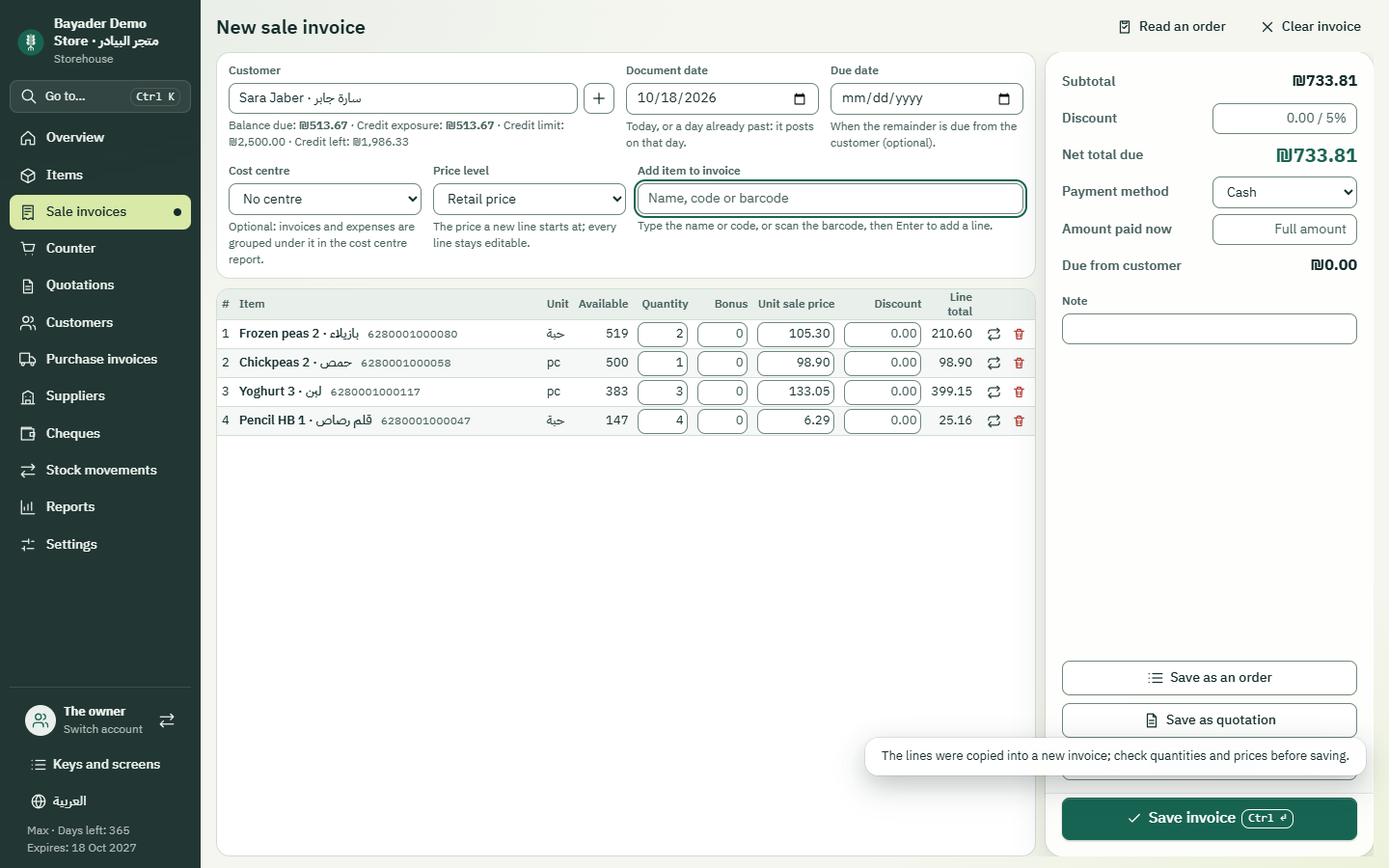
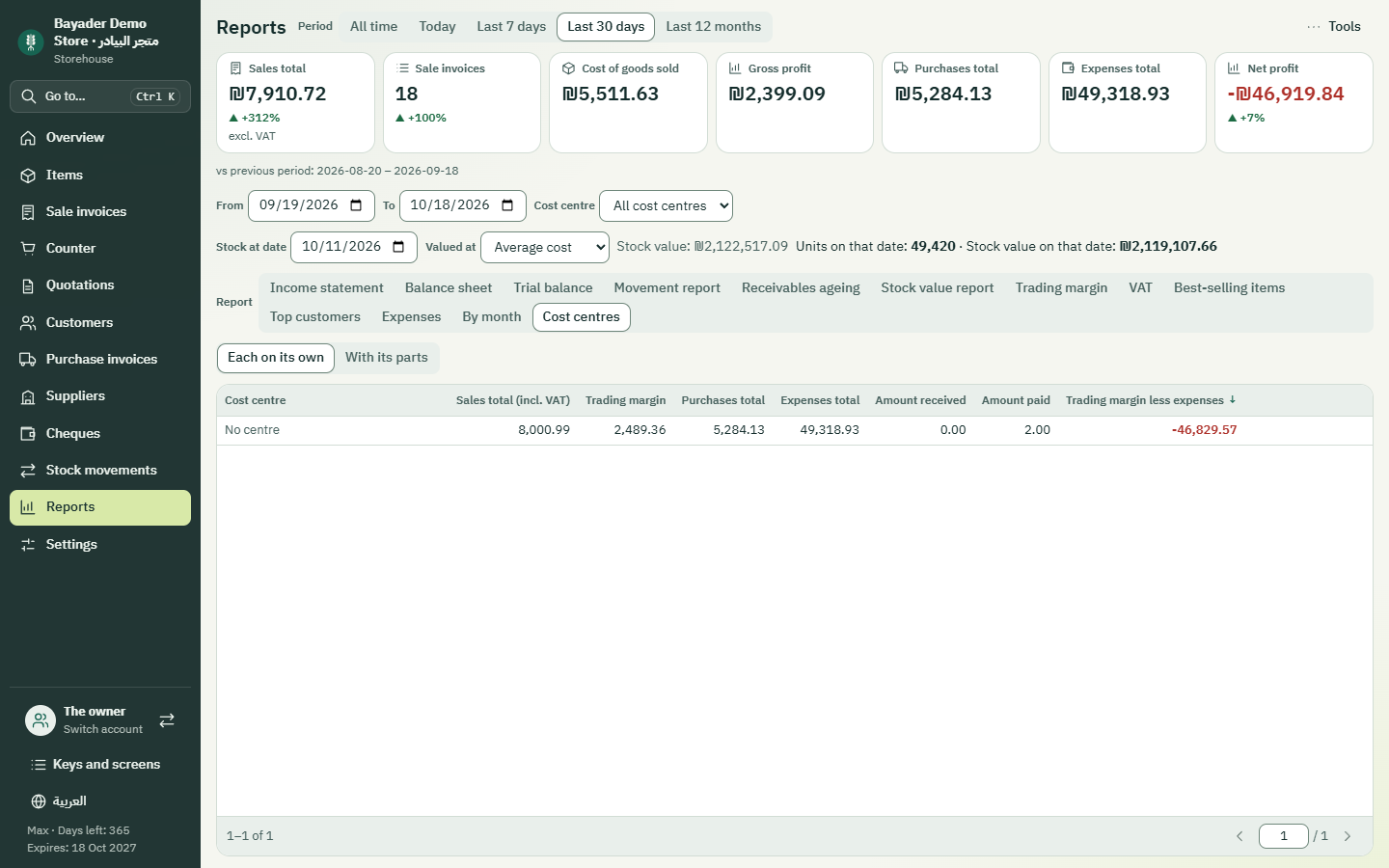
A wholesaler runs the storehouse, the invoices and the accounts from one PC, online or offline, in Arabic or English.
What was delivered
Sale and purchase invoices, returns, cheques, stock counts, reports, user permissions, an activity log, and counter and branch PCs linked to the main PC over the network. Every money movement is recorded in one ledger, and the app is covered by over 1,000 automated tests.
Key features
Works offline on the main PC
Full Arabic interface, English at a click
Point of sale with shifts and cash drawers
General ledger, chart of accounts and cost centres
Bank reconciliation, period close and financial reports
Permissions, payroll, instalments and an activity log
Suggestions while selling, buying and reordering
Signed updates from inside the app
Technology
ElectronJavaScriptNode.jsPlaywright
Screens from Windows version 3.74.1 with demo data, captured on 18 October 2026.
3.106.0 gives a new store a guided start: five welcome slides in Arabic and English once the sign-in is set, replayable from About. A read-only sample book with made-up data lets you look around and brings you back to your own book from a banner. Importing items and customers from CSV shows the column match and up to fifty rows before anything is written, and the file is checked against the book and revision you previewed.
3.105.0
3.105.0 adds what larger storehouses use every day: ABC analysis ranks items by their share of the period's sales, Slow stock lists everything still on hand by the day it last sold with its value, and the overview's reorder list orders every low item from one supplier in a single press. A failed website save no longer remembers the wrong button, the book keeps its attachments small enough for every connected PC, and a delivery zone changed on the website is no longer overwritten from the desktop.
3.104.1
3.104.1 fixes the accounts review: opening balances for customers, suppliers, stock and separate storehouses now reach the ledger once and in their own accounts; till shifts, card settlements, cheques, payroll advances, loyalty points named late, VAT and cost-centre reports, closes, archives and backups behave correctly; Settings keeps what a section does not show; a scanner never saves a dialog by accident; and the website link keeps every order across closes.
3.104.0
3.104.0 adds three website price categories (retail and two quantity seller tiers) with per-tier wholesale rules, seller-code tier selection and a header code menu on the storefront, rolls up parent account balances in the Chart of Accounts, exports 300-DPI QR PNGs, and fixes historical VAT and cost-centre reports and 12-digit barcode labels.
3.103.3
3.103.3 is a fix release: a customer's or supplier's opening balance entered before Start chart and corrected after it now counts once in receivables and payables, not twice. The party file dialog (rep, region, grade, job) no longer clears the phone, address, tax ID and notes.
3.103.1
3.103.1 is a fix release: a legacy return keeps its posted cost when its invoice is corrected. Cancelling a licence in Root Control now agrees with the Owner Console's ledger, one failing list no longer hides the others, and a cancel keeps the renewal row a device move carried. A bundle restore is journalled, so a crash midway is finished or undone at the next start.
3.103.0
3.103.0 adds printable QR cards: on the Website screen, design a compact card or an A4 poster with your public shop address, your description and the Root signature, and download it as SVG or PNG for print. The code opens only your public page and never carries the link key. Tell the website is now offered only for book facts the website can show. The app now runs on Electron 44.10.0, which closes a TLS security advisory.
3.102.4
A payment that settles the oldest bills automatically no longer asks for an exchange rate for a foreign-currency bill that takes none of the money. A return keeps the value of each line it put back in stock, so correcting its invoice later no longer changes that return's reported cost. In the Owner Console, Sign the waiting codes reads every code waiting at Root however many there are, and a code cancelled during signing can no longer deliver its licence. A leave or attendance request now shows the owner the employee, the day, the clock before and after, and the leave's kind and dates. A new Counter or Staff PC code is shown and copied under its own role, not as a Main code.
3.102.3
Owners can map website delivery fees to an existing service while keeping the agreed amount, repair older orders, and finish dispatch and billing without issuing stock twice. Dispatch waits until unresolved lines are mapped, and invoice corrections preserve bonus-item links. Shelf-stock consolidation preserves dispatch and return links and opens recovery if migration cannot finish safely.
3.102.2
Editing a payroll draft records the collections actually included in the representative's commission, so voiding a receipt reclaims only its paid share. Older payrolls remain readable, and archive recovery preserves commission and return evidence without duplicate postings.
3.102.1
Settings search reaches options and saved copies while preserving focus as lists load. Go to keeps the correct customer selected when results refresh. Cloud-folder selection rechecks owner access. Document buttons stay steady while previews update, and cancelling an approval restores the correct preview. Root Control connection details save safely during status refreshes.
3.102.0
A Desk buddy switch in the sidebar shows or hides the buddy from any screen. Settings sections are grouped under Business, People and permissions, and Access and maintenance, and search finds a section by its settings' names and takes you to the matching setting. Includes the foreign-currency returns fix: settlements are calculated exactly and their history stays consistent.
3.101.3
Cloud copies keep archived invoices with their verified indexes and bind each snapshot to its exact history for safe return recovery. Conflicting files and incomplete copies are rejected instead of reported as complete. Legacy files without an index remain readable without inventing missing history.
3.101.2
Restoring archived invoices preserves earlier return entries exactly once, rejects conflicting journal IDs, and keeps legacy opening balances and bank-reconciliation proofs intact. Previously damaged histories are not rewritten automatically.
3.101.0
When you refund a website buyer or correct their order in the book, Tell the website now sends it: the buyer sees the total after your correction and what you gave back, beside the order's own total.
3.100.0
On the Website screen, Order details opens a taken order: its lines and what happened to it on the website, beside its sale order and where that stands in the book. Deleting a sale or removing a purchase leaves the order and quotation it answered open again. A repair ticket delivered on a sale deleted earlier opens again at ready.
3.99.2
A new copy can now be activated with one code, and renewals arrive by themselves. A copy tells Root its version, plan, device id and licence, and nothing from your books; you can switch this off in Settings. The licence owner can also, with a signed order, make a copy read-only, with its books still open.
3.99.1
Deleting the sale that closed a repair ticket opens the ticket again at ready, with its parts back in stock, and it can be delivered again.
3.99.0
The buddy shows today's figures and goes straight to your screens. A picking list for a sale in shelf order, labels for a purchase's items, offers nearing expiry on the day's list, and a valued count variance paper. A scan survives a busy PC. A repair ticket is handed back only with a sale that holds its parts.
3.98.0
3.98.0 makes the app clearly faster on large books: the Overview draws about 16 times faster, saving takes half the time and opening a third. The attention list gains Read again to read the website's orders at once, a website order's lines dialog can now take it in or turn it down, and the app names the sale order it made. Lists with a totals row no longer cut their last row.
3.97.0
3.97.0 adds a Hide button to the desk buddy's mini bar, so the buddy can be dismissed straight from its bar without opening the panel first; bring it back in Settings → General → Desk buddy. The full panel keeps its own Hide, the bar's button steps aside while the panel is open, and neither appears while the app is locked.
3.96.0
3.96.0 makes the day's work clearer: the bell's attention list says when the website was last read and says so when it could not be read, instead of passing old rows off as fresh, and its rows open every branch while the Overview's tiles keep the branch you chose. The desk buddy shows every reminder due together, says notes are private to this PC and user, keeps them across a reload and hides them at lock. The Owner Console adds search and status filters to activation history, counts copies by device, names each delivery button for its customer, and opens the authenticated website admin for one-time console codes and the published downloads. Glass effects now explains itself to screen readers when Windows turns transparency off.
3.95.1
3.95.1: one bell for the app's and the website's work together (website orders, price requests, orders to update, and any money the website holds that the book never took). One code from Root activates the app and links the website in one step. The desk buddy: a small face above other windows that shows what waits for you and keeps your notes and reminders through the day. Includes the 3.94.2 fixes: safe wholesale-code retries and whole barcode scans during a slow redraw. 3.95.1 fixes the Desk buddy switch in Settings so screen readers take its name from its visible label.
3.94.1
3.94.1 corrects the date and method of a receipt paid from the buyer's deposit when it is sent to the website: it now carries the date and method of the money that made the deposit (the receipt, or the sale money a return kept), not the day it was applied or cash every time. Amounts are unchanged.
3.94.0
3.94.0 sends the book's receipts to the website. When the website is told a web order was delivered, the app sends every receipt against that order's invoices with it: the money taken at the sale and each receipt allocated to them, in its method (cash, bank or cheque), amount and date. The website books them as payments on the order, reverses one the book reversed, and never books a receipt past what the order still owes: the app then says how many it did not book because part was collected on the website. Tell the website offers itself again whenever the receipts change.
3.93.0
3.93.0 widens the link between the app and the website. The Website screen shows for each item what buyers can order now and what web orders not yet taken hold. The connection page has two new presses: Send totals sends the shop's sales of the last 30 days (per day, the total after returns and the invoice count only) to the website admin's home, and Send balances sends what the customers of web orders owe, and nothing about any other customer; on the website only finance staff see it. Giving website access no longer undoes a role the owner changed on the website after this PC last sent or read it: the press says so instead. When a delivered web order's invoices are paid in the book, Tell the website now says it is settled in the shop: the website shows it on the order and books no payment. Reading many orders is faster.
3.92.1
3.92.1 strengthens the website link and puts less text on the screens. A large press on items leaves in slices under the website's limit instead of being refused whole. A refused photo says why (its size or its type), and a busy website says busy instead of not answering. The connection page shows the phone console's address with copy and send-to-phone buttons; on the phone one Cloudflare sign-in opens it and it stays signed in. Moving the website link from another storehouse now moves it once confirmed, and moving a trusted PC to another website revokes it at the old one. Optional explanations sit behind a small outlined ? beside the title or field, quiet until hovered or tapped; warnings are never hidden behind it, and each leads with its own ! mark. Copying a link answers at once, and a long line no longer widens the website activity dialog.
3.91.2
3.91.2 carries the full-app review's fixes. A damaged approvals file is never silently emptied: a batch with no id is kept aside with the file, and the warning stays after a restart or a restore. An ordinary save no longer replaces a book that became unreadable while saving. Users, other PCs, backups, bundles, approvals and the activity log say Loading until their first read answers, and the activity log and approvals name every command in both languages. A new wholesale code is copied before its dialog closes, delivery fees are checked where they are typed, the lock screen focuses a control it can use, and a refused save's line shows its focus ring.
3.91.1
3.91.1 in the style of T3 Code: fewer words and icons on the screens. A table's action buttons show on the row under the pointer or keyboard, on/off settings are switches, a section's help sits beside its title, and the sidebar's licence line shows only when it matters. Night mode has softer lines and thinner scrollbars. Includes the 3.90.2 fixes: a write from another PC never runs twice, a damaged approvals file is kept, and exports and backups are always written whole. A sign-in pressed while a background archive runs is sent when it ends instead of being lost.
3.90.1
3.90.1: photos you choose for an item before it is on the website stay with it until they go up, even when the website refuses the send, the dialog is closed or some photos are refused; the item's dialog shows what is left with Send them. Read again on the Content tab reads the website's design again too.
3.90.0
3.90.0 in the style of T3 Code and MiniMax: a bell beside the search at the top of the sidebar shows a red dot when something is late or waits on someone, and opens what needs your attention. Every icon button shows its name the moment the pointer or the keyboard reaches it, and a greyed one says why. Night mode is now near-black with hairline borders, keeping the brand green.
3.89.0
3.89.0: the Website screen lists every item once with its state on the website and its own Show or Hide, and a new item's photos go up with the press that shows it. Managed from the app, with no sign-in to the website admin: delivery zones and fees, wholesale codes and price tiers, the website's look, home sections and information pages (publish or save a draft), and the website's activity log.
3.88.0
3.88.0: scanning an item again adds to its line instead of a new one, a return shows its refund after discounts, locked buttons say why, and the Counter starts at the chosen customer's last price. The Website screen gains Save and update website, a notice when the website does not answer, a question before moving the link, and a count of waiting quote requests. A purchase correction is dated on the goods' receipt.
3.87.0
3.87.0 makes Check for updates one press, as in T3 Code: the update icon at the foot of the sidebar opens its popover already checking, and when a newer version is known it opens on its notes and Install. The window stays usable while the feed answers, and presses at the same time share one request.
3.86.0
3.86.0 takes T3 Code's style: the sidebar folds away by its button or Ctrl+B and stays as you left it; Settings, language, keys and updates sit as one row of icons at its foot with a one-click update; the sidebar is not redrawn while you search; and Go to shows each command's key. Month-end explains each step, opens its screen and can lock after one question; stock counts refuse stale quantities; invoice corrections stay in their original period; and the Website screen names the real reason for a refusal.
3.85.2
3.85.2 keeps cheque due dates complete and wraps long references inside deposit and amend dialogs. It also includes the VAT/refund, duplicate approval prevention, website access recovery, permission checks and update notification fixes from the unpublished 3.85.1 build.
3.85.0
A quieter workspace: neutral light and charcoal dark themes, a searchable Settings page with theme previews, and update checks that refresh without disturbing your work. Automatic update news is now announced to screen readers. No book or permission behavior change.
3.84.0
A calmer sidebar: the footer is now one ordered system cluster (account, language, keys and screens, Check for updates, then the licence line). The updates row opens a small popover carrying the updater's own states — checking, the new version with its notes and Install, the latest version, and a refusal in the updater's own words — with an amber dot on the row when a newer version is known. No book or permission behavior change.
3.83.1
Suite 3.83.1 carries the audit fixes: backup restore preserves the current activity history, base-currency changes are refused after financial postings, pending website operations are bound to their owner's session and revoked when authorization ends, and bundle verification lists ten full bundles. No accounting or stock behavior change.
3.83.0
Suite 3.83.0 connects the website with one key-free setup link, approves this PC once with a matching code, then opens the website admin from the program without an email code each time; devices and sessions can be revoked. Sending items and accepting orders stays manual.
3.82.0
Suite 3.82.0 moves optional explanations behind question-mark help in the app and website admin while keeping balances, warnings and order terms visible. Supports touch, keyboard, small windows and inline guidance in older browsers.
3.81.1
Suite 3.81.1 corrects the website admin linking instructions to match manual Website actions, distinguishing saving the connection, publishing items and updating details. No automatic payment synchronization or book/permission behavior change.
3.81.0
One checked suite release with the Root Shop website: the app and website share version 3.81.0 while the link protocol stays v1. No book or permission behavior changes.
3.80.3
Website publishing now clearly distinguishes Show on website from Update website details, which preserves visibility. The connected website environment is shown explicitly, and item updates avoid unnecessary full-list reloads and repeated calculations.
3.80.2
Website publication now reports a failure instead of success when the website returns an empty or malformed reply, and accepts older websites that cap their error list at fifty rows.
3.80.1
Website management now remains compatible with older website services, avoids sending the saved website key after the licence is inactive, and keeps management tables usable at supported window sizes. Invalid team sign-in times display safely instead of breaking the screen.
3.79.0
The website link is safer: a change made in the website admin is never overwritten by the shop PC without being told, the words the admin typed and did not publish are never dropped, a photo press whose answer was lost does not leave two photos, and the Link part opens the website's own admin and its pages in your browser.
3.78.4
Every word of the app was reviewed in both languages: one term for the customer, the correct order of the Arabic diacritics, straight quotes in the English help, and a full stop at the end of each sentence. Nothing changes in behaviour: 3.78.4 works exactly as 3.78.3 did.
3.78.3
One fix missed in 3.78.2: the Website staff role select is now announced as Give as, matching its column header, so a screen reader says what the control will do. Nothing else changes.
3.78.2
Clearer words on the Website screen: the price column now says it is the price to send, the photo count is labelled Photos, Tick all matching covers every filtered row on every page, and the staff email field is wide enough to read.
3.78.1
Removed unused internal code and labels. No behavior change: 3.78.1 works exactly as 3.78.0.
3.78.0
Manage website photos and Featured from the item dialog. Photos now display correctly, and adding, moving or removing photos keeps the item editable after closing and reopening. Stale changes are refused with a refresh message; thumbnails stay out of the book.
3.77.0
The Website console's remaining backlog: a one-million-listing bound on the listings pages, one press at a time on an order, the old customer removed when an order is re-pressed for another buyer, and a failed rollback written to the activity log. Sending stock now tells the website first about every order invoiced or delivered since it was taken, including one closed into an archive, so pieces are never held twice. The screen also shows a listing that was removed before as archived rather than gone, and the Website staff list follows a deactivated user.
3.76.2
Fixes to the Website screen: website access can now be taken from a user moved to another storehouse, and is still given only to the linked storehouse's users. A website key that 3.76.0 kept as plain text is sealed at start, or dropped and asked for again when Windows cannot seal it. Reading the status of many accepted orders is faster.
3.76.1
Fixes to the Website screen: every website item and every accepted order is read however many there are, a customer made for an order whose acceptance did not finish is removed again, and Update or Hide never removes a frozen item from the website. The website key is kept only when Windows seals it, staff access is limited to the linked storehouse and can be taken from a stopped user, and telling the website an order's status is in the activity log. With another storehouse open, the screen says so and reads nothing.
3.76.0
A Website screen for shops with the website add-on: the website is managed by hand from the app instead of the automatic sync. Publish, hide, update or remove items, accept or reject web orders, give staff access, and edit the website's content and contact details. Nothing reaches the website until you press a button.
3.75.1
A copy activated before 3.75 keeps its online store through an upgrade or an early renewal until its code ends, and a paired PC shows whether the main PC's shop is linked.
3.75.0
The website is sold as an add-on to the Storehouse and Business editions, and About shows which Root products this copy holds. Copies activated before this release keep the online store until their subscription ends.
3.74.1
A payment or receipt dated before a bill's currency agreement is now refused by naming the agreement, the receipt screen stops at the oldest dollar bill it cannot settle that day, and a production paper shows each input's exact worth so its lines agree with its total.
3.74.0
The All storehouses report takes the margin between storehouses out of stock and profit by the receiving store's average cost, as its books do, so the group's stock value and profit read at the group's real cost.
3.73.0
Foreign amounts show beside their base value, the most specific refusal is named first, Arabic amounts in words read correctly, and the remaining review findings are closed.
3.72.8
A supplier credit in a foreign currency is refunded at its worth at that day's rate, with the difference booked as an exchange gain or loss, and is applied only to bills in its own currency at its own agreed rate.
3.72.7
A supplier credit in a foreign currency is revalued at the month end like a debt: a purchase paid in part and then partly returned now shows its gain or loss at the month-end rate, instead of "No open foreign-currency debt in this month."
3.72.6
A branch PC stays signed in when one read of the book fails on the main PC during another save: only that request fails, instead of the branch showing "The app is locked."
3.72.5
The VAT report keeps papers from before chart start in their own filed period when a purchase or an expense is removed, a purchase is corrected at zero cost, or a sale is edited, deleted or returned after chart start: the earlier amount comes back out on the change's date, in the cost centre it was carried in.
3.72.4
The VAT report keeps a purchase's receipt from before chart start in its own filed period when the purchase is corrected later: that amount comes back out on the correction's date, in the cost centre it was carried in, so the total over both periods is unchanged.
3.72.3
A safer online store link: another store's address is refused without its own key, so nothing is sent there, and a link code pasted into the address field moves its key into the hidden key field and is sent only to its own store.
3.72.2
A whole-app review: stock loaded onto a rep from the shelf sells and returns without a warehouse shortfall, the VAT report includes older purchase activity once at its own rates, production salary cost credits its true expense account, plus fixes to the online store link, updates and settings.
3.72.1
The online store link is safer: a saved link key is only ever sent to the same store, a pasted link code is read exactly as the store admin gives it, and a first link without a key clearly asks for the link code.
3.72.0
Linking the online store is now one paste: copy the link code from the store admin with one click and paste it into Settings → Online store → Store address. The code carries the address and the key together; the key stays encrypted on this PC.
3.71.1
An online-store order's delivery fee is now added as its own line on the sale order for every delivery method (company vehicle or carrier), so the total matches what the customer pays. Store pickup stays free.
3.71.0
The online store link sends net sales and invoice counts for the last 30 local days, excluding deleted invoices and deducting returns. Totals stay correct across daylight-saving changes and period closing. Older websites keep syncing. No item, customer, cost or profit details are sent.
3.70.0
Online items now carry selling units and pack deals, staff-only shelf locations, and best-seller ranks for the last 90 days. Choose which items appear on the website in SmartStore, or keep the website in control. Clearing a shelf or unit name also clears the website copy.
3.69.0
Link to the online store: items, prices, stock, customers and staff reach the store every two minutes, and web orders arrive as sale orders that post only once invoiced. Cost, suppliers and payroll never leave the shop.
3.68.0
A Getting started list on the overview leads a new book in five steps from the first start to the first sale, marking each step done from the book itself.
3.67.1
The overview's update check tries again ten minutes after a failure and twice a day, gives up after 20 seconds, and Install update installs only the version you confirmed.
3.67.0
A new version from Root now shows on the overview when the app opens, one click from Install update.
3.66.1
A design touch: row buttons are quieter so the figures lead, and finished month-end checks step back so the waiting one stands out.
3.66.0
A cheque's outcome at the bank needs the bank-numbers permission, a storekeeper cannot sell to another storehouse below cost, and count differences post to 53 Stock adjustments.
3.65.3
Payroll pays overtime once for hourly staff, never deducts a day on leave, gives absent days no overtime, and closes the month at local midnight across clock changes. Deleting a partly returned sale takes back only the loyalty points still held, and an endorsed cheque cannot settle a foreign-currency bill.
3.65.2
Late freight is shared by purchase line, storehouse and production (first in, first out); a branch request whose answer was lost is answered again, never twice; a confirmation before deleting a held cart; and a clear shortfall when cash handed over is short.
3.65.1
Clearer Arabic and smarter search, aligned numeric columns and a new lock screen. Suggestions for sales, purchases and reordering, signed in-app updates, and data-integrity fixes. Long cheque references and shift counts remain complete in printed papers.
3.52.1
A daily overview and financial reports scoped by date and cost centre, accounting reconciliation, and improved Arabic terminology and amounts in words.
3.36.0
Adding an item already on an invoice makes a new row, and On account (debit) sales with paid-now and due following the payment choice.
3.35.0
Settings reorganised: business details apart from the lists, with Save always in view.
3.34.0
Instalments, repairs, and features switched on by type of business.
3.33.0
Employees: files, attendance, leave, advances, payroll runs and payslips.
3.32.0
Storekeepers receive, count and transfer stock; the owner sets prices and approves.
3.31.1
A clear status on every invoice, a smarter lock screen, quick Go to, and invoices sent on WhatsApp.
3.30.0
Invoices linked with cheques.
3.29.0
Clear permissions between owner, storekeeper and cashier.